Everything You Need to Know About YouTube Ask Studio
YouTube recently launched the first iteration of its brand-new AI feature: ‘Ask Studio’. With search engines and social platforms like Google, Meta and Microsoft recently debuting their own AI features and chatbots, it only seemed like the natural next step for YouTube to bring its own AI tool to the party. And of course… we immediately had to test it out and share our opinion!
Keep reading to learn everything you need to know about ‘Ask Studio’, from its unique time-saving features to its potential limitations.
What exactly is YouTube ‘Ask Studio’?
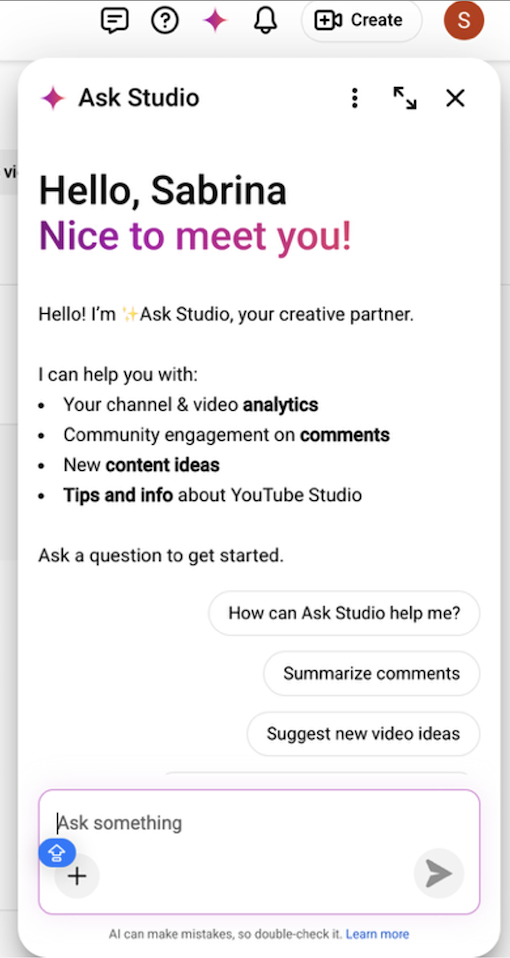
Google describes ‘Ask Studio’ as an AI creative partner integrated into YouTube Studio. The tool aims to make it quicker and easier for you to understand your channel statistics, summarise your audience engagements (likes, comments, and watch behaviours), and brainstorm ideas for upcoming videos. It acts as a personalised conversational chatbot, allegedly saving time by providing strategic and actionable insights based on your channel data.
What are ‘Ask Studio’s’ key features and capabilities?
‘Ask Studio’ has four primary capabilities when it comes to assisting you with your YouTube presence:
1. Performance Analysis
It can dive into your analytics to explain how your videos are performing, where your traffic is coming from, and why certain metrics (views or watch time) might be changing.
2. Content Strategy & Brainstorming
It can help you come up with new video ideas, refine your titles and descriptions, or create outlines and scripts tailored to your audience's interests.
3. Audience insights
It can summarise what your audience are saying in the comments, identify common questions, and help you understand what topics your community is most excited about.
4. YouTube guidance
If you have questions about how YouTube works or need help with Studio features, ‘Ask Studio’ can provide clear, actionable information to help you navigate the platform.
What are the limitations of ‘Ask Studio’?
We found that the primary drawback to using ‘Ask Studio’ is its inability to access data from any other YouTube channel but your own, even if the data in question is in the public domain. For example, it’s unable to comment on the number of public views another channel or video has received.
Without the ability to compare your content and data to any other YouTube channels, ‘Ask Studio’ is unable to contextualise its responses to take into consideration the wider YouTube ecosystem. What does this mean?
1. It can’t tell you how your channel or content is performing compared to your primary competitors or an industry standard. This means that any performance benchmarks or KPIs are based solely on your channel’s performance to date.
2. ‘Ask Studio’ doesn’t have an awareness or understanding of your brand, so its recommendations aren’t always reflective of a channel’s goals.
3. Without access to any data outside of your channel, ‘Ask AI’ has a very small pool of information to base its feedback on. Hence, us (mere) humans can gather more information manually than ‘Ask AI’ can often offer, and consequently make better informed strategic decisions.
4. YouTube isn’t inclined to talk poorly of itself, so there’s automatic bias in ‘Ask Studio’s’ reporting skills.
5. Any content plans or ideation suggestions offered by the chatbot are relatively general, which could lead to similar content being produced across multiple competitor channels.
When we questioned ‘Ask Studio’ about our clients’ channels positioning on YouTube in comparison to industry benchmarks and key competitors, this was the recurring response:
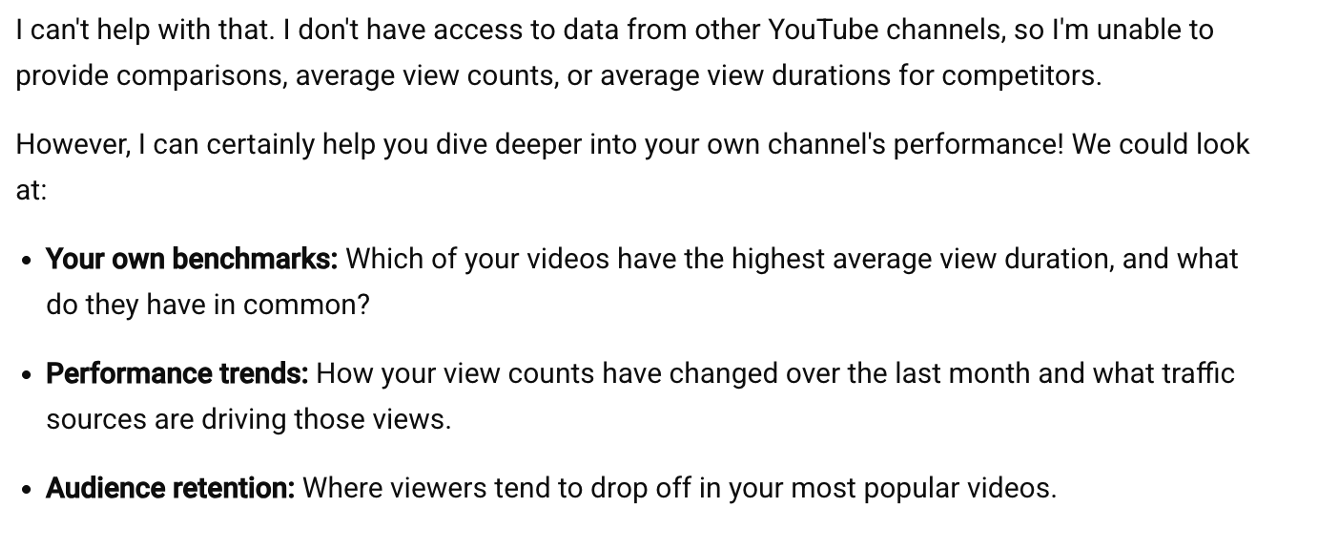
It’s also important to remember that, as with all AI platforms, ‘Ask Studio’ can make mistakes. It’s a feature that’s still in its beta form, meaning it’s still in a testing stage before YouTube decides to roll it out across all channels. We recommend you double check the accuracy of the data and information that it’s pulling, especially when your questions are more complex.
How can I get the best out of it?
There are some best practices you can follow to ensure that you’re getting the most useful and relevant information to help you with your queries.
Have a clear objective: Think about what you want to achieve and be concise and clear in how you communicate this.
Be specific with your questions: The more precise your prompts, the better the Ask Studio can tailor its responses. For example, instead of 'Tell me about my channel’s recent performance', try 'What is the average view duration across my five most recent Shorts?'.
Try out the suggested prompts at the top of the page (as pictured):
Make sure to experiment with your questioning to find out how best ‘Ask Studio’ works for you and your channel.
What are the best questions to ask ‘Ask Studio’?
There are multiple different types of questions you can ask your handy AI chatbot, whether that be simple, data driven questions, including:
What’s the Average View Duration across the 10 most recent films on my channel?
Which of the films in my playlist has the most views?
What’s the top traffic source on my channel?
Or more complex questions, asking for recommendations and advice in order to improve your channel performance, like:
What can I do to improve the Average View Duration on my content?
How can I increase the number of likes on my content?
What content ideas would work well on my channel?
What does seem to be a very useful feature of ‘Ask Studio’ is its audience analysis capabilities. Your personal chatbot can give you important insights into who is watching your content, what other types of content your audience typically watches, and what current content trends might appeal to your viewers. So, consider asking questions like “can you give me content recommendations based on my audience.”

Our Conclusion
YouTube’s integration of an AI chatbot was to be expected, and so far, we can see the value in the Ask Studio. Its ability to quickly provide key channel statistics, recommendations and audience insights is a true time saver. Saying that, ‘Ask Studio’s’ accuracy is still up for debate whilst it’s in its beta testing stage. Alongside its inability to formulate advice based on any data outside of your own channel performance, it’s important that you take any recommendations and insights from the chatbot with a pinch of salt. As always, use this AI tool to help you, but don’t rely on it for the growth and success of your channel – at the end of the day, we’re still in the ‘your brain does a better job than AI’ boat!
Find out more about how AI is changing how your content is created, discovered, and the consumer journey:
YouTube Ask Studio FAQs:
Which YouTube channels have access to ‘Ask Studio’?
Ask Studio is available to most YouTube channels in the United States, Canada, New Zealand, India, the United Kingdom, the European Economic Area and Latin America. If you don't see the ‘Ask Studio’ icon in the top corner of the YouTube Studio, it means that you don't yet have access to the feature. This will likely change as YouTube rolls out more advanced versions of the AI tool over the coming months.
Where can I find ‘Ask Studio’ in the YouTube Studio, and how can I get started with using it?
1. Sign in to YouTube Studio or access Ask Studio directly to get started.
2. In the top-right corner of the page, tap Ask Studio
3. Select one of the suggested prompts or type your own question.
Why can’t I use ‘Ask Studio’ in the YouTube app?
‘Ask Studio’ is still in a testing phase and is currently only available via your web browser on your computer. In time, this will likely change and the YouTube AI chatbot will roll out across all channels and all devices. Until that time, it’s use is limited to your computer desktop.