How to Optimise Your YouTube Channel Homepage
TL;DR
Your YouTube channel homepage has four key elements: your banner, profile picture, bio and content shelves.
Banner dimensions: 2,560 × 1,440px recommended, with a safe area of 1,235 × 338px so your messaging survives cropping across devices
Your bio should tell a new visitor what your channel is about and what to expect, not repeat your company mission statement
Shelves guide visitors to what to watch next. They're not just a replay of your upload order
A strong homepage gives new visitors a clear reason to explore, watch and subscribe.
Your YouTube channel homepage is effectively your shop window. Before someone watches a video, they can see your branding, what your channel is about and how you've organised your content. And new visitors decide whether to stick around in seconds.
From the top down, your channel homepage is made up of a banner, your profile picture, your bio, and finally your shelves. Get those elements right and a visitor can quickly understand whether your channel is worth exploring.
In this guide, we'll break down the key elements of a YouTube channel homepage, including banner dimensions, profile pictures, bios and content shelves, and explain how to use each one to create a clearer viewing journey that supports your channel growth.
What Should Be on Your YouTube Channel Homepage?
The key elements of your YouTube Channel Homepage are:
Channel banner
The first thing a visitor sees, and your chance to make your brand instantly recognisable
Profile picture
Small, but it appears everywhere, so it needs to be clear and consistent with your wider branding
Channel bio
Tells visitors what your channel is about and what to expect
Shelves
Sit underneath lower down your channel and organise your content once someone's decided to explore further.
There's more than one way to approach each of these depending on your brand and what you want the channel to do. Here are our top-line tips to get you started.
How To Customise Your YouTube Channel Homepage
You can customise your YouTube channel homepage through YouTube Studio, including your banner, profile picture, channel description and the content shelves visitors see.
You can also choose which sections appear and how your content is organised. This gives you control over the journey a new visitor takes through your channel, so you can put your most relevant content front and centre rather than simply displaying your latest uploads.
YouTube Channel Banner Dimensions and Best Practice
Your banner is one of the first things a visitor sees, so make the space count. It should be instantly recognisable and reinforce your brand identity and channel proposition.
Keep the design clean, consistent with your wider brand, and make sure any important messaging stays visible across devices.
YouTube channel banner dimensions:
Recommended: 2,560 × 1,440px
Minimum: 2,048 × 1,152px
Aspect ratio: 16:9
Safe area for text and logos: 1,235 × 338px at the minimum dimensions
Maximum file size: 6MB
Important elements such as logos, text and key messaging should sit within the safe area, since the banner is cropped differently across desktop, mobile and TV.
Find out everything you need to create a YouTube banner that’s effective, on-brand, and purposeful.
What Should Your Profile Picture Do?
Your profile picture or channel icon shows up next to every video, comment and search result you appear in, so it needs to work at a small size and stay consistent everywhere it's used. Keep it aligned with your wider brand assets and avoid anything with fine detail or text, since it rarely reads clearly once it's shrunk down.
Best practice for your YouTube profile picture:
Use a recognisable logo or brand mark
Avoid small text or details that are hard to see
Check it at a small size before uploading
Keep it consistent with your other social profiles
Consider how it looks against both light and dark backgrounds
Find out how to make the perfect YouTube channel icon.
What Should You Put in Your YouTube Channel Bio?
Your channel bio should give a new visitor a sense of who your brand is, what they'll find on the channel, and why they should subscribe, all at a glance.
Keep it concise and audience focused. Use your bio to communicate your YouTube positioning and the type of content viewers can expect, rather than dropping in your company's mission statement.
When you're writing yours, think about:
Who or what is your brand?
What does the channel offer?
What can viewers expect from you?
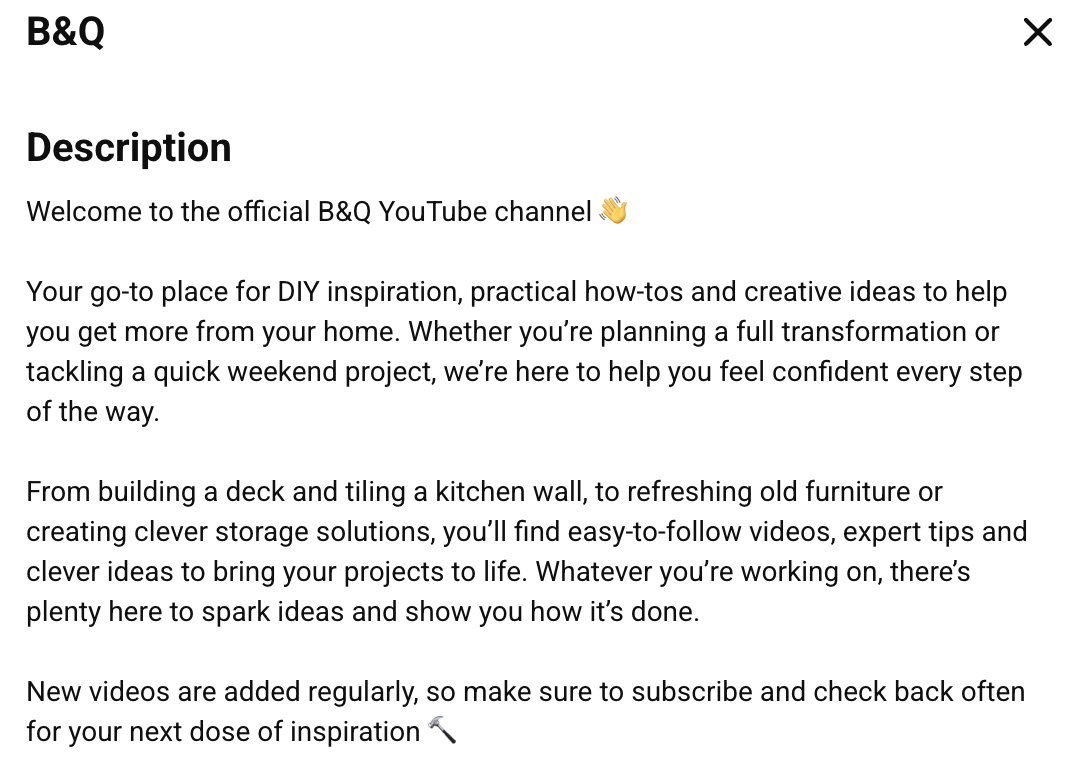
Here's how our client B&Q approaches theirs, giving new visitors a clear sense of what the channel covers in the first line:
“Your one-stop shop for home and garden inspiration. From quick DIY fixes to full room makeovers, we’ll help you get the job done.”
What Are YouTube Channel Shelves and How Should You Use Them?
Shelves organise your channel layout so content into clear, easy-to-browse viewing journeys. Instead of leaving content in the order it was posted, think about what you want a new visitor to watch next.
For example, Iif you're a DIY brand your shelves might be:
Quick fixes
Room makeovers
Garden projects
Everything you need to know about flooring
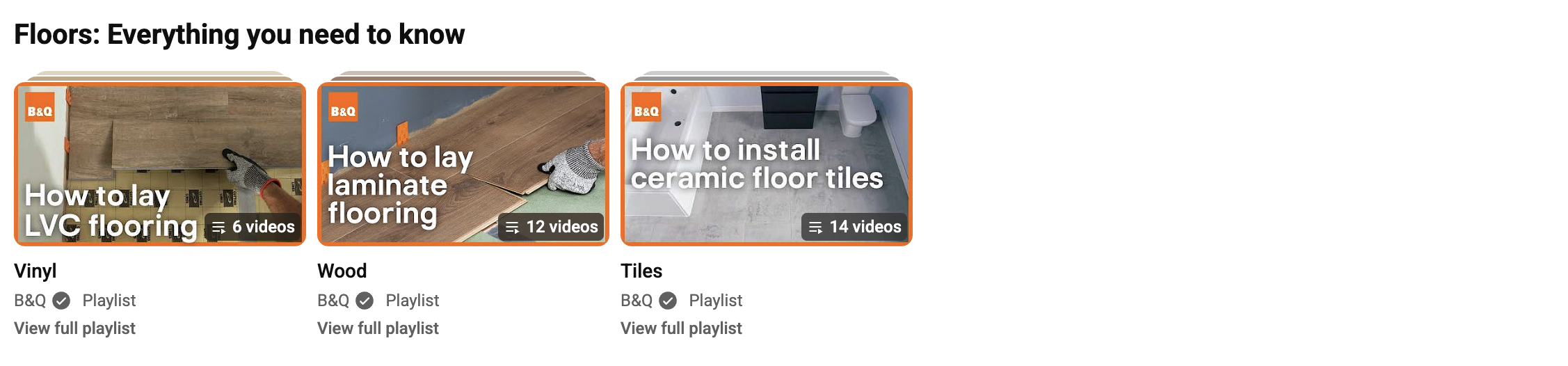
YouTube also offers automatic shelves, such as For You, which personalise the content shown to each viewer. The For You shelf serves a tailored selection from your channel, helping viewers discover videos relevant to them without you having to build the journey manually.
Best practice for shelves:
Build shelves around clear content themes or viewing journeys
Avoid shelves that are overcrowded or have no consistent theme
Every shelf should give the viewer a reason to keep scrolling
YouTube Channel Homepage FAQs
What size should a YouTube channel banner be?
YouTube recommends 2,560 × 1,440px, with a minimum of 2,048 × 1,152px. Keep important text and logos within the 1,235 × 338px safe area so nothing gets cropped out on mobile or TV.
What should I write in my YouTube channel bio?
Focus on what your channel offers and what viewers can expect, rather than your company's mission statement. A new visitor should understand your channel's purpose within a few seconds of reading it.
What are YouTube channel shelves?
Shelves are sections on your channel homepage that group videos into themes or viewing journeys. YouTube also generates automatic shelves, like For You, which personalise content for each viewer.
Does my channel homepage affect the YouTube algorithm?
Not directly, but it affects viewer behaviour, which the YouTube algorithm does track. Clear navigation and relevant content can make it easier for viewers to find something they want to watch, which can contribute to stronger viewer behaviour. So, think of your homepage as a way to support discovery and viewing journeys.
Can you cutomise your YouTube Channel homepage?
Yes. You can customise elements including your channel banner, profile picture, description and the sections that appear on your homepage. You can also choose which content appears in different sections to create a more intentional viewing journey.
Your Homepage Is Your First Impression
Your channel homepage is often a new visitor's first real impression of your brand on YouTube, and it only takes a few seconds for them to decide whether to stick around. A strong banner builds instant recognition, a clear bio tells visitors exactly what to expect, and well-organised shelves guide them toward the content most likely to turn a casual click into a subscribe.
Not sure whether your YouTube channel is making the right first impression? Get your free YouTube channel audit and see how your homepage is performing today.