TL;DR
YouTube Shorts are vertical videos of up to three minutes, discovered mainly through the swipe feed rather than search, with over 200 billion daily views across the platform.
Shorts sit inside YouTube rather than in a separate app, appearing on the homepage, the Shorts tab, channel shelves, search, and the subscriptions feed on TV.
The feature set has moved fast. Shorts ads now support comments and website links, related videos let you point Shorts at your long-form content, and AI creation tools are built into the app.
For brands, Shorts work best as a discovery layer feeding a long-form channel, not as a standalone content strategy.
YouTube has always been the place for long-form video, but as consumer behaviour has rapidly evolved, so has the platform. In response to the demand for mobile-first, short-form content, YouTube Shorts has grown into a snackable content powerhouse with over 200 billion daily views, since their launch in September 2020.
Fully integrated into the YouTube ecosystem, Shorts videos give you an opportunity for wider discovery, engagement, and sustained growth by complementing your long-form content.
We manage Shorts as part of the YouTube channels we run for global consumer brands, so what follows is what we've found actually moves the needle, not just what YouTube has announced.
If you're not already using Shorts as part of your content strategy, now is the time. If you are, this guide will help you do it even better in 2026.
What are YouTube Shorts?
First, let’s take a step back and get on the same page about exactly what YouTube Shorts is and how they have developed.
Google’s answer to TikTok and Instagram Reels, Shorts are designed for bite-sized, mobile-first video discovery. First launched in India in 2020 at 15 seconds maximum, they have now evolved to a maximum length of 3-minutes to give you more flexibility to tell your story - this increase in length was a top requested feature by creators and brands.
While Shorts don't have a standalone app like TikTok, they're deeply embedded in YouTube’s experience. They appear in a dedicated ‘Shorts’ tab on YouTube online, the mobile app and now even have a row in the subscriptions feed on the TV app. Viewers can discover them:
On the YouTube homepage
Via the Shorts tab
In channel shelves
Through hashtags and search
In the subscriptions feed on the TV app
Shorts are designed to grab attention instantly. That means fast pacing, concise storytelling, and content that entertains or informs in seconds.

How does YouTube Shorts work
You can create YouTube Shorts videos directly in the YouTube app using built-in tools like music, filters, captions, and effects. Or, upload them from the desktop version, as long as they meet the 9:16 vertical format.
Tapping a Short video launches a swipeable vertical player where clips auto-play and loop, encouraging extended viewing.
Bear in mind your viewers are scanning your content more quickly within Shorts. They will see your channel name, and title. Descriptions aren't visible in the feed, but they still help YouTube index your content against the right topics.
Users will also see all the interactive features, such as:
Like/dislike buttons
Commenting and sharing
Subscribe button
Audio reuse and remix links
Related content links
Keep reading to understand exactly what opportunities you have with YouTube shorts.
What’s new in YouTube Shorts (2025–2026)
Shorts creation and performance tools have gotten smarter, faster, and more integrated in recent years as it has been developed as a meaningful rival to platforms like TikTok and Instagram. Here are some of the most important YouTube Shorts updates that you should be aware of, as a brand marketer:
Take control of your Shorts thumbnail
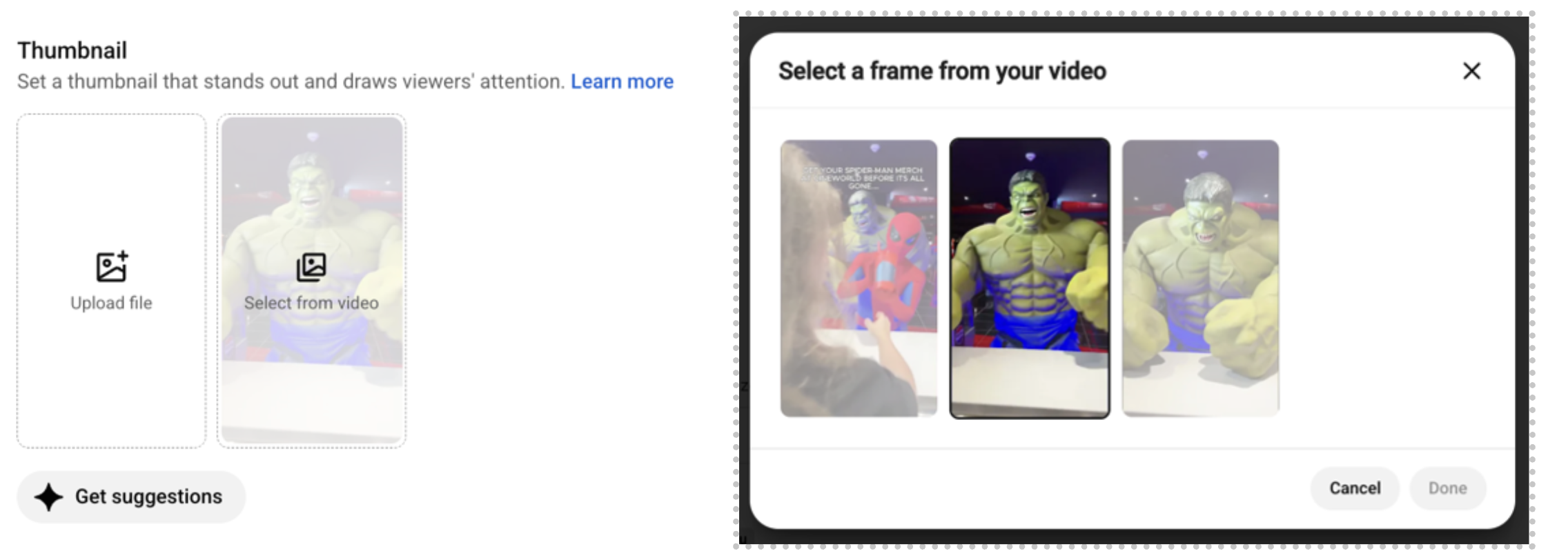
As of August 2026, you can edit your Shorts thumbnail from YouTube Studio on desktop. Before this, it was mobile app only, which meant managing thumbnails from a phone or leaving the opening frame to chance.
A gap to know about: on desktop, you're currently limited to three key frames rather than the free scrub, frame-by-frame selection you get in the mobile app (see Fig. 1). If you need precise control over the exact frame your short opens on, the mobile app still gives you more choice for now.
Our key recommendations for Brand Shorts thumbnails:
Clarity. Make it obvious what someone is clicking into before they tap
Branding. Keep your branding consistent so your Shorts are recognisable in the feed
Less is more. Sometimes, simply picking the right frame does more work than a fully designed cover
Expanded advertising features
At the end of 2025 YouTube announced it would be expanding the ways you can use ads on YouTube Shorts to engage with your audience. This includes:
Introducing comments on Shorts ads to give your brand more ways to interact with audiences and match the experience of organic Shorts.
Enabling you to link directly to your brand’s website, encouraging viewers to explore further.
Launching Shorts ads for mobile web as consumers watch and engage across more devices and surfaces - TV, web, desktop and mobile app.
AI-driven creation tools
At the start of 2025 YouTube CEO Neal Mohan said: “We’ll continue to responsibly harness the power of AI to enhance the YouTube experience for everyone.” This means using AI tools to empower your brand, but not lead your content creation. With that AI-driven features have become more accessible, making it easier than ever to generate ideas, edits, and even visuals:
Veo, YouTube’s generative video AI, helps creators with everything from scripts to final edits and will soon be upgraded to Veo2.
Dream Screen allows you to generate AI-powered backgrounds by typing a prompt.
The YouTube Inspiration Tab provides tailored video ideas based on trending topics in your niche.
Related Links
In 2024 YouTube introduced its related video feature to Shorts. This allows you to direct viewers to more of your content and is a feature that we regularly see underused. It can only be done after the shorts video has been uploaded by opening YouTube Studio on desktop, then heading to “Content”. Use this feature to:
Push viewers to your long-from content
Link to Livestreams
Highlight other Shorts on your channel
Improved in-studio editing
The YouTube Shorts editing suite has also had significant upgrades in the last year:
Beat Sync matches your clips to music automatically.
Remix tools let you build on existing content, from other Shorts or long-form videos.
Voice dubbing and multi-language audio are being rolled out for Shorts, making content more accessible to global audiences.
Future interactive features
YouTube is currently testing interactive elements within Shorts like:
Quizzes
Polls
Stickers
These features aim to drive deeper engagement and create two-way interaction. They are great for educational, entertainment, and brand content and valuable in community building.
If you want to stay up to date on more new features coming to YouTube and what they mean for your brand follow us on LinkedIn.
YouTube has changed how Shorts views are counted
A view is now recorded each time a Short starts to play or is replayed, even if it's for a short amount of time. Previously, a view was only counted after a Short had been watched for a certain number of seconds.
This puts shorts in-line with other short-form video platforms and highlights the importance of optimising your YouTube Shorts for organic discoverability.
How the YouTube Shorts Algorithm works in 2026
The Shorts algorithm is tuned for rapid engagement! Similar to long-form it looks at key engagement metrics, like how quickly people interact and whether they watch the whole video, swipe away, like, comment, or rewatch - but ultimately Shorts (in contrast to the original (long-form) side of Youtube) is reliant on swipe based discovery not search - with the majority of views coming from the feed itself.
This means that Shorts videos need to be measured in different ways. The Shorts algorithm is based on a user's watch history, content trends, and previous engagement. And, unlike long-form video, click-through rate (CTR) isn’t a ranking factor, since users don’t actively click Shorts - they swipe through them.
In 2026, whilst the algorithm in some ways prioritises new uploads YouTube now also gives Shorts more time to perform, so virality is not limited to 48 hours. Videos can gain traction over weeks, especially if reused audio or hashtags trend.
Creators and brands now have access to detailed Shorts-specific analytics in YouTube Studio, including:
Viewer drop-off points
Retention rate
Performance by audio or remix activity
Check out our blog on how the YouTube Shorts algorithm works for more insights.
Creating effective Shorts in 2026
Strong Shorts start with a strong concept. Think about the audience first and what’s going to stop them from swiping.
Prioritise the hook: Grab viewers' attention immediately with content that evokes curiosity and intrigue about your brand.
Optimise thumbnails for branding: While less important for initial discovery, thumbnails contribute to a professional channel image, so select something that feels appropriate.
Adapt storytelling for short-form: Whether you're repurposing your long-form content or creating Shorts from scratch, focus on concise narratives and impactful moments.
Optimise your metadata: hashtags, keyword-rich titles, and captions will help ensure your content ranks in front of the right audience.
Link to existing content: use the related video tool to drive viewers to your long-form content.
Why YouTube Shorts Are Worth the Investment for Your Brand
Long-form YouTube is where people decide whether they trust your brand. Shorts is where they find out you exist. Those are two different jobs, and your channel needs both.
Most Shorts views come from people who don't subscribe to the channel that posted them, which makes the feed one of the few places on YouTube where your brand reaches a genuinely cold audience without paying for the impression. The audience is less duplicated than you'd expect, too. Google's research with Arla found that 47% of YouTube Shorts users aren't on TikTok at all, so Shorts adds reach rather than repeating it.
The formats that consistently earn their place for the brands we work with:
Product teases & micro-demonstrations
Repurposing long-form content, guided by retention spikes rather than guesswork
Behind-the-scenes & team moments that build familiarity
Reactive content tied to trends or events
Community content & UGC
Answering the questions your audience asks in the comments
We ran a 12-week Shorts trial with B&Q that generated 3.7 million impressions at a 76% average view rate. Read how we approached it.
Build a YouTube Shorts Strategy for Your Brand
Shorts has gone from a feature to a full content ecosystem inside YouTube, with its own tools, its own analytics and its own audience. Used well, it puts your brand in front of people who have never come across your channel.
The brands that get value from Shorts treat it as a discovery layer feeding their long-form channel, with a plan behind it rather than a repurposing habit.
We ran a 12-week Shorts trial with B&Q that generated 3.7 million impressions at a 76% average view rate. You can read how we approached it.
Get in touch and let's build a Shorts strategy that works for your brand.
YouTube Shorts FAQs
What is a YouTube Short?
A vertical video of up to three minutes, shot in a 9:16 ratio and watched in a swipeable feed that auto-plays and loops. Shorts sit inside YouTube rather, so they share your channel, subscribers, and back catalogue with your long-form content.
Where do YouTube Shorts appear?
In more places than most brands realise: the YouTube homepage, the dedicated Shorts tab, shelves on your channel page, search and hashtags, and a Shorts row in the subscriptions feed on the TV app.
Can you upload YouTube Shorts from a desktop?
Yes. Any vertical video within the length limit is treated as a Short. The difference is the creation tools, since music, filters, captions, and effects are only available in the app.
Can you edit a YouTube Shorts thumbnail?
Yes. As of August 2026, YouTube Studio on desktop lets you choose from three key frames. The mobile app still offers more control, with a full frame-by-frame scrubbing.
Can you add a link to your website from a YouTube Short?
Shorts ads now support direct website links. For organic Shorts, the related video tool in YouTube Studio lets you point a Short at a long-form video, a livestream, or another Short on your channel.
Can brands use trending audio on YouTube Shorts?
Only partly. Brand and business channels are generally limited to YouTube's Commercial Music Library rather than the full trending catalogue, and where trending tracks are available they're licensed for videos of 60 seconds or less.
Do YouTube Shorts help grow your main YouTube channel?
They can, but not on their own. A Short taking off won't push viewers toward your longer videos automatically. See our guide to how the YouTube Shorts algorithm works for how to build that bridge.